tutorials
Step 6: Resource Models
Business applications often require language-specific (translatable) text used as labels and descriptions on the user interface.
The example we used at the start of this tutorial was quite simplistic as we stored language-specific text directly in a JSON model object. Generally speaking, unless language-specific text comes directly from a back-end system, it’s not considered good programming practice to put translatable texts directly into a model. So, let’s fix this by placing all translatable texts (such as field labels) into a resource bundle.
Preview
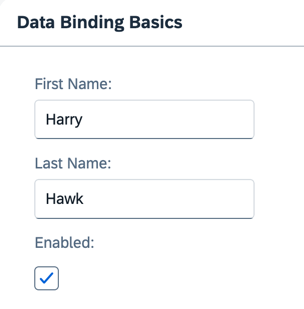
The texts are now derived from a resource model (No visual change to last step)
You can view this step live: 🔗 Live Preview of Step 6.
Coding
You can download the solution for this step here: 📥 Download step 6 (TS)📥 Download step 6 (JS).
Folder structure for this step
webapp/
├── i18n/
│   └── i18n.properties
├── model/
│   └── data.json
├── view/
│   └── App.view.xml
├── Component.ts/.js
├── index.html
└── manifest.json
Create a new entry in the manifest.json file under the models entry as shown in the coding below. The resource model is set to the component using the model name i18n. The data comes from the i18n.properties file as specified in the bundleName entry in the settings. Since we’re creating a resource model, the file name is assumed to have the extension .properties; this does not need to be stated explicitly.
Also add the i18n property to the sap.app section and modify the title and description property to use the corresponding texts from the i18n.properties as shown below.
webapp/manifest.json
...
    "sap.app": {
        ...
        "title": "{{appTitle}}",
        "description": "{{appDescription}}",
        "i18n": {
            "bundleName": "ui5.tutorial.databinding.i18n.i18n",
            "supportedLocales": [
                "",
                "de"
            ],
            "fallbackLocale": ""
        },
        ...
    },
    ...
    "sap.ui5": {
        ...
        "models": {
            "": {
                "type": "sap.ui.model.json.JSONModel",
                "uri": "./model/data.json"
            },
            "i18n": {
                "type": "sap.ui.model.resource.ResourceModel",
                "settings": {
                    "bundleName": "ui5.tutorial.databinding.i18n.i18n",
                    "supportedLocales": [
                        "",
                        "de"
                    ],
                    "fallbackLocale": ""
                }
            }
        },
        ...
    }
...
📝 The configured
supportedLocalesrepresent the following i18n files present (see Step 7):
""-i18n/i18n.properties"de"-i18n/i18n_de.propertiesThe configured
fallbackLocaleshould represent one of these files. According to the fallback chain, the root bundle ("") is the last fallback. Configuring it explicitly avoids side effects when additional resource files are added. For more information, see Supported Locales and Fallback Chain.
Update the i18n.properties and add the code shown below.
webapp/i18n/i18n.properties (New)
# App Descriptor
appTitle=Data Binding Tutorial
appDescription=A simple app that explains how to use data binding features of OpenUI5

# Field labels
firstName=First Name
lastName=Last Name
enabled=Enabled

# Screen titles
panelHeaderText=Data Binding Basics
The panelHeaderText property has been moved from the JSON model into the i18n resource bundle. Also, the field labels are no longer hard-coded in the XML view. This is because all of these text fields need to be translated.
Language-specific text stored in resource models obeys the Java convention for internationalization (i18n).
Modify the data binding for the panel header and the labels in App.view.xml to include the model name. Note that a “greater than” character separates the model name and the property name. Also, i18n property names must not start with a slash character.
webapp/view/App.view.xml
<mvc:View
    xmlns="sap.m"
    xmlns:form="sap.ui.layout.form"
    xmlns:core="sap.ui.core"
    xmlns:mvc="sap.ui.core.mvc"
    core:require="{ColumnLayout:'sap/ui/layout/form/ColumnLayout'}">
    <Panel
        headerText="{i18n>panelHeaderText}"
        class="sapUiResponsiveMargin"
        width="auto">
        <form:SimpleForm
            editable="true"
            layout="ColumnLayout">
            <Label
                text="{i18n>firstName}"/>
            <Input
                value="{/firstName}"
                valueLiveUpdate="true"
                width="200px"
                enabled="{/enabled}"/>
            <Label
                text="{i18n>lastName}"/>
            <Input
                value="{/lastName}"
                valueLiveUpdate="true"
                width="200px"
                enabled="{/enabled}"/>
            <Label
                text="{i18n>enabled}"/>
            <CheckBox
                selected="{/enabled}"/>
        </form:SimpleForm>
    </Panel>
</mvc:View>
Remove the line panelHeaderText : "Data Binding Basics" from the model data in the data.json file. This text has now been moved to the resource model.
webapp/model/data.json
{
    "firstName": "Harry",
    "lastName": "Hawk",
    "enabled": true
}
Remove the init function and the import of sap/ui/model/BindingMode from Component.ts/.js as we do not want to set the one-way binding mode anymore.
webapp/Component.ts/.js
// webapp/Component.ts
import UIComponent from "sap/ui/core/UIComponent";

/**
 * @namespace ui5.tutorial.databinding
 */
export default class Component extends UIComponent {
	public static metadata = {
		interfaces: ["sap.ui.core.IAsyncContentCreation"],
		manifest: "json"
	};
}
// webapp/Component.js
sap.ui.define(["sap/ui/core/UIComponent"], function (UIComponent) {
	"use strict";

	return UIComponent.extend("ui5.tutorial.databinding.Component", {
		metadata: {
			interfaces: ["sap.ui.core.IAsyncContentCreation"],
			manifest: "json"
		}
	});
});
You can use multiple model instances by using different model names. The model name can be set as the second parameter when using the setModel(oResourceModel,"i18n") method. The model is then propagated under this name to all aggregated child controls (and their children, and so on …). All these controls have access to this model under the name i18n as well as to the JSONModel (default model, which has no name).
Next: Step 7: (Optional) Resource Bundles and Multiple Languages
Previous: Step 5: One-Way Data Binding
Related Information