tutorials
Step 7: (Optional) Resource Bundles and Multiple Languages
Resource bundles exist to enable an app to run in multiple languages without the need to change any code. To demonstrate this feature, let’s create a German version of the app – in fact, all we need to do is create a German version of the resource bundle file. In our code, we activate the German locale for the ResourceModel.
Preview
The texts are now adapted for the German locale
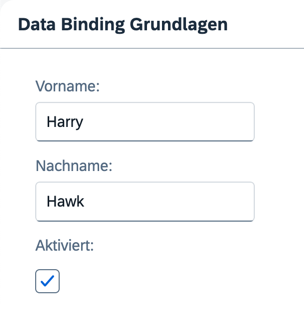
You can view this step live: 🔗 Live Preview of Step 7.
Coding
You can download the solution for this step here: 📥 Download step 7 (TS)📥 Download step 7 (JS).
Folder structure for this step
webapp/
├── i18n/
│   ├── i18n.properties
│   └── i18n_de.properties
├── model/
│   └── data.json
├── view/
│   └── App.view.xml
├── Component.ts/.js
├── index.html
└── manifest.json
webapp/i18n/i18n_de.properties (New)
In the i18n folder, duplicate the i18n.properties file and rename its copy to i18n_de.properties. Replace the English text with the German text provided below. The suffix de represents the locale for the German language. Since the de locale is already set in the supportedLocales configuration of the manifest.json, it will be taken into account.
# App Descriptor
appTitle=Data Binding Tutorial
appDescription=Eine einfache Anwendung zur Erkl\u00e4rung der UI5 Data Binding Funktionen

# Field labels
firstName=Vorname
lastName=Nachname
enabled=Aktiviert

# Screen titles
panelHeaderText=Data Binding Grundlagen
To check the result, append the sap-language=DE URL parameter to the URL in your browser, for example http://localhost:port/index.html?sap-language=DE. Once you remove this parameter, your app reverts to your browser’s default language.
Next: Step 8: Binding Paths: Accessing Properties in Hierarchically Structured Models
Previous: Step 6: Resource Models
Related Information
Localization </content>