tutorials
Step 5: One-Way Data Binding
Unlike the two-way binding behavior we’ve seen, one-way data binding is also possible. In this case, data travels in one direction only: from the model, through the binding instance, to the consumer (usually the property of a control), but never in the other direction. Let’s modify the previous example to use one-way data binding. This shows how you can switch off the flow of data from the user interface back to the model if needed.
Preview
Two input fields and a checkbox
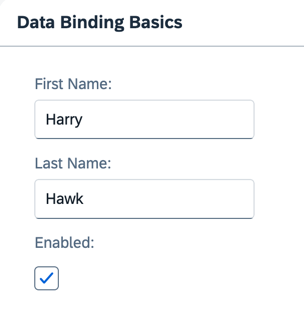
You can view this step live: 🔗 Live Preview of Step 5.
Coding
You can download the solution for this step here: 📥 Download step 5 (TS)📥 Download step 5 (JS).
Folder structure for this step
webapp/
├── model/
│   └── data.json
├── view/
│   └── App.view.xml
├── Component.ts/.js
├── index.html
└── manifest.json
Insert the highlighted code into the Component.ts/.js file. The init function calls the init function of its parent, retrieves the default model instance bound to the component, and sets the default binding mode to one-way data binding.
webapp/Component.ts/.js
// webapp/Component.ts
import UIComponent from "sap/ui/core/UIComponent";
import BindingMode from "sap/ui/model/BindingMode";

/**
 * @namespace ui5.tutorial.databinding
 */
export default class Component extends UIComponent {
    public static metadata = {
        interfaces: ["sap.ui.core.IAsyncContentCreation"],
        manifest: "json"
    };

    public init(): void {
        super.init();
        this.getModel().setDefaultBindingMode(BindingMode.OneWay);
    }
}
// webapp/Component.js
sap.ui.define(["sap/ui/core/UIComponent", "sap/ui/model/BindingMode"], function (UIComponent, BindingMode) {
	"use strict";

	return UIComponent.extend("ui5.tutorial.databinding.Component", {
		metadata: {
			interfaces: ["sap.ui.core.IAsyncContentCreation"],
			manifest: "json"
		},
		init: function () {
			UIComponent.prototype.init.call(this);
			this.getModel().setDefaultBindingMode(BindingMode.OneWay);
		}
	});
});
Now, regardless of the state the checkbox is in, the input fields remain open for input, because one-way data binding ensures that data flows only from the model to the UI, but never in the other direction.
The binding mode (one-way or two-way) is set on the model itself. Therefore, unless you specifically alter it, a binding instance will always be created using the model’s default binding mode.
If you wish to alter the binding mode, you’ve got two options:
-
Alter the model’s default binding mode. This is the approach we used above.
-
Specify the data binding mode for a specific binding instance by using the
oBindingInfo.modeparameter. This change only applies to this data binding instance. Any other binding instances will continue to use the model’s default binding mode.For more information, see API Reference:sap.ui.base.ManagedObject.bindProperty.
📝 There are two important points to understand about alterations to a model object’s data binding mode:
If you alter the default binding mode of a model (as in the example above), all binding instances created after that point in time will use the altered binding mode, unless you explicitly say otherwise.
Altering a model’s default binding mode doesn’t affect already existing binding instances.
Next: Step 6: Resource Models
Previous: Step 4: Two-Way Data Binding