tutorials
Step 2: Data Access and Client-Server Communication
In this step, we see how the Table that is bound to the People entity set initially requests its data, and how the data can be refreshed. We use the Console tab in the browser developer tools to monitor the communication between the browser and the server. We see the initial request as well as the requests for refreshing the data.
Preview
App with a toolbar that contains a Refresh button
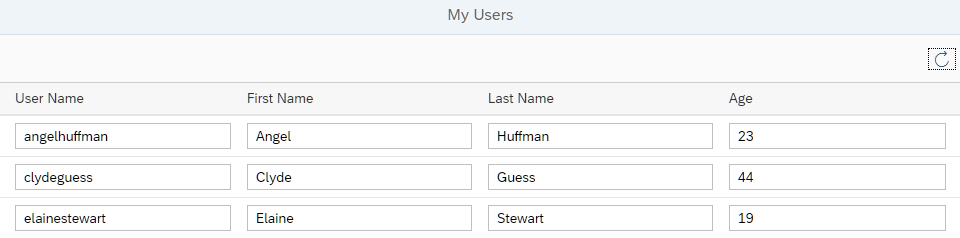
You can view this step live: 🔗 Live Preview of Step 2.
Coding
You can download the solution for this step here: 📥 Download step 2 (TS)📥 Download step 2 (JS).
webapp/controller/App.controller.ts/.js
// webapp/controller/App.controller.ts
import Controller from "sap/ui/core/mvc/Controller";
import MessageToast from "sap/m/MessageToast";
import MessageBox from "sap/m/MessageBox";
import JSONModel from "sap/ui/model/json/JSONModel";
import ResourceModel from "sap/ui/model/resource/ResourceModel";
import ResourceBundle from "sap/base/i18n/ResourceBundle";
import Component from "sap/ui/core/Component";
import List from "sap/m/List";
import type ListBinding from "sap/ui/model/ListBinding";

/**
 * @namespace ui5.tutorial.odatav4.controller
 */
export default class App extends Controller {

	/**
	 *  Hook for initializing the controller
	 */
	onInit(): void {
		const jsonData = {
			busy: false
		};
		const model = new JSONModel(jsonData);

		this.getView().setModel(model, "appView");
	}

	/* =========================================================== */
	/*           begin: event handlers                             */
	/* =========================================================== */

	/**
	 * Refresh the data.
	 */
	onRefresh(): void {
		const binding = (this.byId("peopleList") as List).getBinding("items") as unknown as { hasPendingChanges(): boolean; refresh(): void };

		if (binding.hasPendingChanges()) {
			MessageBox.error(this._getText("refreshNotPossibleMessage"));
			return;
		}
		binding.refresh();
		MessageToast.show(this._getText("refreshSuccessMessage"));
	}

	/* =========================================================== */
	/*           end: event handlers                               */
	/* =========================================================== */

	/**
	 * Convenience method for retrieving a translatable text.
	 * @param sTextId - the ID of the text to be retrieved.
	 * @param aArgs - optional array of texts for placeholders.
	 * @returns the text belonging to the given ID.
	 */
	_getText(textId: string, args?: unknown[]): string {
		const bundle = ((this.getOwnerComponent() as Component).getModel("i18n") as ResourceModel).getResourceBundle() as ResourceBundle;
		return bundle.getText(textId, args as string[]);
	}
}
// webapp/controller/App.controller.js
sap.ui.define(["sap/ui/core/mvc/Controller", "sap/m/MessageToast", "sap/m/MessageBox", "sap/ui/model/json/JSONModel"], function (Controller, MessageToast, MessageBox, JSONModel) {
  "use strict";

  const App = Controller.extend("ui5.tutorial.odatav4.controller.App", {
	/**
	 *  Hook for initializing the controller
	 */
	onInit() {
	  const jSONData = {
		busy: false
	  };
	  const model = new JSONModel(jSONData);
	  this.getView().setModel(model, "appView");
	},
	/* =========================================================== */
	/*           begin: event handlers                             */
	/* =========================================================== */
	/**
	 * Refresh the data.
	 */
	onRefresh() {
	  const binding = this.byId("peopleList").getBinding("items");
	  if (binding.hasPendingChanges()) {
		MessageBox.error(this._getText("refreshNotPossibleMessage"));
		return;
	  }
	  binding.refresh();
	  MessageToast.show(this._getText("refreshSuccessMessage"));
	},
	/* =========================================================== */
	/*           end: event handlers                               */
	/* =========================================================== */
	/**
	 * Convenience method for retrieving a translatable text.
	 * @param sTextId - the ID of the text to be retrieved.
	 * @param aArgs - optional array of texts for placeholders.
	 * @returns the text belonging to the given ID.
	 */
	_getText(textId, args) {
	  const bundle = this.getOwnerComponent().getModel("i18n").getResourceBundle();
	  return bundle.getText(textId, args);
	}
  });
  return App;
});
We add the event handler onRefresh to the controller. In this method, we retrieve the current data binding of the table. If the binding has unsaved changes, we display an error message, otherwise we call refresh() and display a success message.
📝 At this stage, our app cannot have unsaved changes. We will change this in Step 6.
We also add the private method _getText to retrieve translatable texts from the resource bundle (i18n model).
webapp/view/App.view.xml
...
<Page title="{i18n>peoplePageTitle}">
  <content>
    <Table
      id="peopleList"
      growing="true"
      growingThreshold="10"
      items="{
        path: '/People'
      }">
      <headerToolbar>
        <OverflowToolbar>
          <content>
            <ToolbarSpacer/>
            <Button
              id="refreshUsersButton"
              icon="sap-icon://refresh"
              tooltip="{i18n>refreshButtonText}"
              press=".onRefresh"/>
            </content>
          </OverflowToolbar>
        </headerToolbar>

        <columns>
...
We add the headerToolbar with a single Button to the Table. The button has a press event to which we attach an event handler called onRefresh.
webapp/i18n/i18n.properties
# App Descriptor
...

# Toolbar
#XTOL: Tooltip for refresh data
refreshButtonText=Refresh Data

# Table Area
...

# Messages
#XMSG: Message for refresh failed
refreshNotPossibleMessage=Before refreshing, please save or revert your changes

#XMSG: Message for refresh succeeded
refreshSuccessMessage=Data refreshed
We add the tooltip and message texts to the properties file.
Under the Hood
To get more insight into the client-server communication, we open the Console tab of the browser developer tools and then reload the app.
📝 To monitor the client-server communication in a productive app, you would use the Network tab of the developer tools.
In this tutorial, we are using a mock server instead of a real OData service so that we can run the code in every environment. The mock server does not generate any network traffic, so we use the Console tab to monitor the communication.
If you want to switch to the real service, do the following:
In the
index.htmlfile, remove the linedata-sap-ui-on-init="module:sap/ui/core/tutorial/odatav4/initMockServer".Check the URI of the default data source in the
manifest.jsonfile. Depending on the environment, change it to something that avoids cross-origin resource sharing (CORS) problems. For more information, see Request Fails Due to Same-Origin Policy (Cross-Origin Resource Sharing - CORS)
We search for the following mock server requests:
-
https://services.odata.org/TripPinRESTierService/(S(id))/$metadata
This first request fetches the metadata that describes the entities of the service (see also OData Version 4.0. Part 3: Common Schema Definition Language (CSDL) Plus Errata 03).
The server responds with an XML file that describes the entities, for example, entity type
"Person"has several properties such asUserName,FirstName,LastName, andAge.Note:
The URL contains the session ID
(S(id)). Since the public TripPin service can be used by multiple persons at the same time, the session ID separates read and write requests from different sources. You could use a different ID or request the service without a specified session ID. In the latter case, you will get a response with a new, random session ID. -
The second request fetches the first 10 entities from the OData service. The
growingThreshold="10"setting in the implementation of theTablecontrol in theApp.view.xmlfile defines that only 10 entities are fetched at the same time from the'/people'path. Further data is only loaded when requested from the user interface (growing="true"). Therefore, there are only 10 entities requested at the same time by using$skip=0&$top=10(see System Query Option $top and $skip in the Basic Tutorial on the OData home page.)This request explicitly lists the fields that should be included in the response by using the
$selectquery option. Although the TripPin service has more fields in itsPeopleentity set, only those four are included in the response. This is a feature of the OData V4 Model called “automatic determination of$select”, or “auto-$select”. It helps restricting the size of responses to what is really needed. TheODataModelcomputes the required fields from binding paths specified for controls. This feature is not active by default. In our case, this is activated by setting theautoExpandSelectproperty totruewhen instantiating the model in themanifest.jsondescriptor file .
Next: Step 3: Automatic Data Type Detection
Previous: Step 1: The Initial App
Related Information
API Reference: sap.ui.model.odata.v4.ODataMetaModel
API Reference: sap.ui.model.odata.v4.ODataListBinding.refresh