tutorials
Step 8: Binding Paths: Accessing Properties in Hierarchically Structured Models
In Step 6 , we stated that the fields in a resource model are arranged in a flat structure; in other words, there is no hierarchy of properties. However, this is only true for resource models. The properties within JSON and OData models are usually arranged in a hierarchical structure. So, let’s explore how to reference fields in a hierarchically structured model object.
Preview
A second panel with address data is added
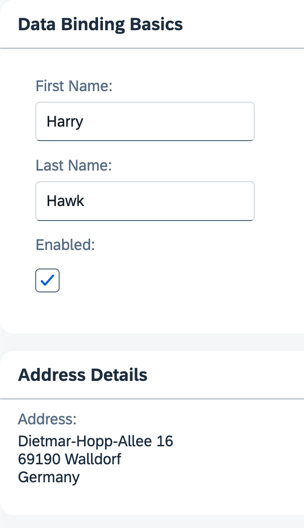
You can view this step live: 🔗 Live Preview of Step 8.
Coding
You can download the solution for this step here: 📥 Download step 8 (TS)📥 Download step 8 (JS).
Folder structure for this step
webapp/
├── i18n/
│   ├── i18n.properties
│   └── i18n_de.properties
├── model/
│   └── data.json
├── view/
│   └── App.view.xml
├── Component.ts/.js
├── index.html
└── manifest.json
In the data.json file, add an additional sub-object named address. This object has four properties: street, city, zip, and country.
webapp/model/data.json
{
    "firstName": "Harry",
    "lastName": "Hawk",
    "enabled": true,
    "address": {
        "street": "Dietmar-Hopp-Allee 16",
        "city": "Walldorf",
        "zip": "69190",
        "country": "Germany"
    }
}
Add a new panel to the App.view.xml with a new Label and FormattedText pair of elements.
The text property of the Label element is bound to the i18n resource bundle field address.
The htmlText property of the FormattedText element is bound to four JSON model properties: /address/street, /address/zip, /address/city, and /address/country. You can achieve the resulting address format by separating each one of these JSON model property references with a hard-coded newline character. Note that zip and city are separated by a space.
webapp/view/App.view.xml
<mvc:View
xmlns="sap.m"
xmlns:form="sap.ui.layout.form"
xmlns:l="sap.ui.layout"
xmlns:core="sap.ui.core"
xmlns:mvc="sap.ui.core.mvc"
core:require="{ColumnLayout:'sap/ui/layout/form/ColumnLayout'}">
<Panel
headerText="{i18n>panel1HeaderText}"
class="sapUiResponsiveMargin"
width="auto">
...
</Panel>
<Panel
headerText="{i18n>panel2HeaderText}"
class="sapUiResponsiveMargin"
width="auto">
<content>
<l:VerticalLayout>
<Label
labelFor="address"
text="{i18n>address}"
showColon="true"/>
<FormattedText
class="sapUiSmallMarginBottom"
htmlText="{/address/street}<br>{/address/zip} {/address/city}<br>{/address/country}"
id="address"
width="200px"/>
</l:VerticalLayout>
</content>
</Panel>
</mvc:View>
Update the i18n.properties and i18n_de.properties files as shown below.
webapp/i18n/i18n.properties
...

# Screen titles
panel1HeaderText=Data Binding Basics
panel2HeaderText=Address Details
webapp/i18n/i18n_de.properties
...

# Screen titles
panel1HeaderText=Data Binding Grundlagen
panel2HeaderText=Adressdetails
📝 The resource bundle files now contain new properties for the address and a new panel header text. Both panel properties are numbered.
In the XML view, inside the curly brackets for the binding path of the
htmlTextelement, you’ll notice that the first character is a forward slash. This is necessary for binding paths that make absolute references to properties in JSON and OData models, but you must not use it for resource models. After the first forward slash character, the binding path syntax uses the object name and the property names separated by forward slash characters ({/address/street}).Remember, all binding path names are case-sensitive.
Next: Step 9: Formatting Values
Previous: Step 7: (Optional) Resource Bundles and Multiple Languages
Related Information
JSON Model </content>