tutorials
Step 4: Modernize a Legacy OpenUI5 Project (40 min)
| ← Previous: Step 3 — Convert to TypeScript | Back to Overview | Next: Step 5 — Create a custom control in TypeScript (optional) → |
In this step you run the UI5 Modernization workflow on a deliberately legacy app. The workflow is a structured, five-phase process: it detects issues with the UI5 linter, delegates fixes to specialized skills, commits each phase separately, and re-runs the linter as a verification gate before moving on.
The legacy app is a to-do app (based on
flovogt/openui5-sample-app) seeded with
intentional anti-patterns.
📝 This app is a curated “before” state. Some parts are deliberately legacy (see 4.2); others are already modern and serve as a reference. In particular, its test infrastructure already uses the Test Starter concept and its
index.htmlbootstrap is already CSP-compliant — so Phase 1 has little to do and Phase 5 finds nothing to fix here. That’s expected; the value is seeing the workflow correctly detect “already clean” as well as fix real issues.
4.1 Set up the legacy app
Download the legacy app legacy.zip and save it into the apps folder you created in Step 2. Then open a new terminal in your apps folder and run:
tar -xf legacy.zip
cd legacy
npm install
The modernization workflow makes one git commit per phase, so initialize a dedicated git repo here so the per-phase commits land in their own timeline.
First, create a .gitignore file in the legacy/ folder with the following content:
node_modules/
Then initialize the repo:
git init && git add -A && git commit -m "baseline: legacy app"
All subsequent tasks in this step run from the legacy/ folder. First, install the UI5 modernization plugin:
claude plugin install ui5-modernization@claude-plugins-official
Then open Claude Code:
claude
📝
legacyis a new folder, so Claude Code asks you to trust it on launch (see Step 1 → section 1.4); confirm to proceed.
4.2 Take a baseline linter reading
💡 Task: Ask Claude Code:
Run the UI5 linter on this app and report the UI5 linter findings.
The baseline for this app is 36 problems (30 errors, 6 warnings) and 1 fatal error — the findings map directly to the modernization phases:
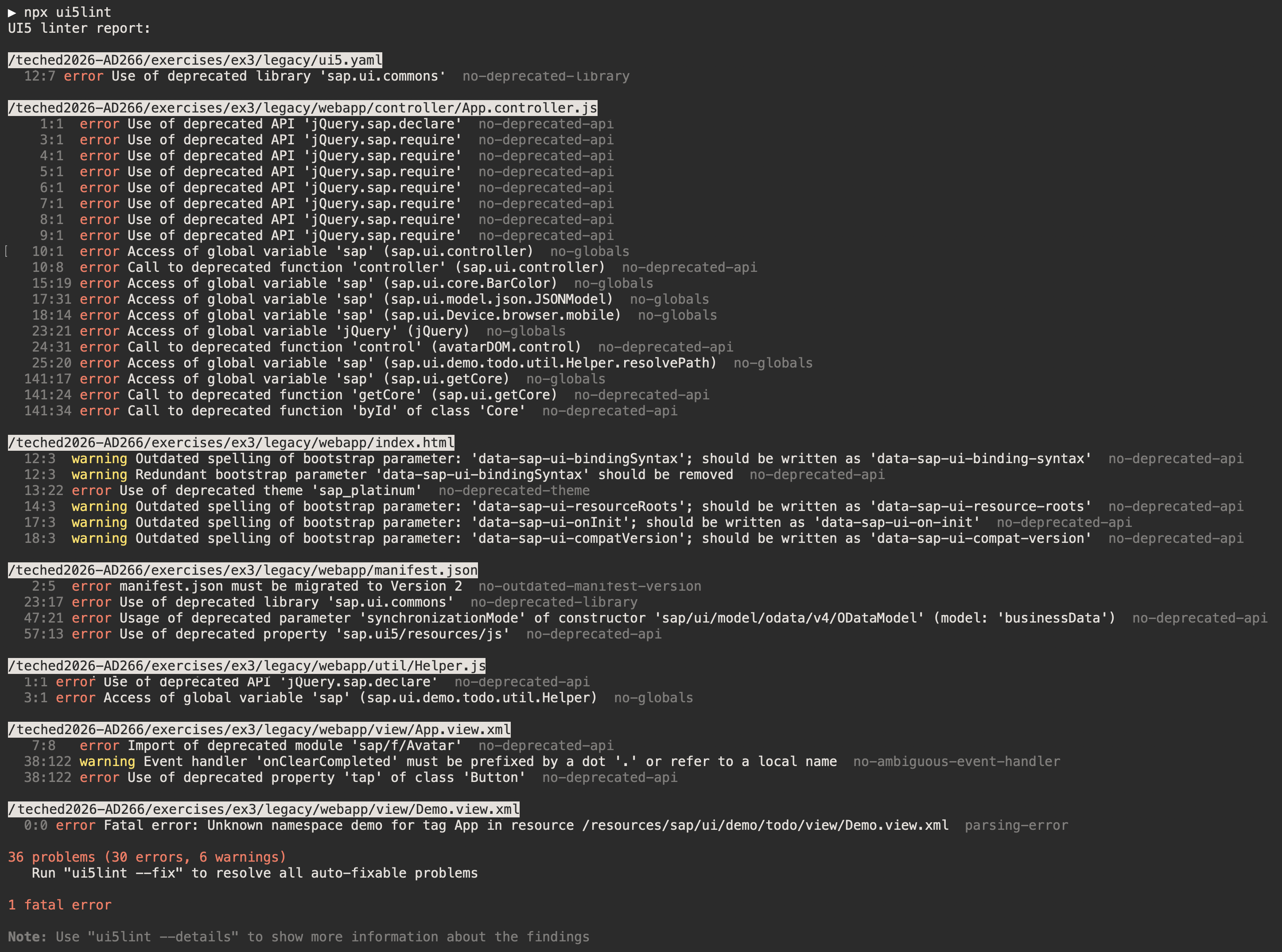
You should see findings that map to the modernization phases. A tour of what’s intentionally wrong:
| Phase | Anti-pattern in this app | Where |
|---|---|---|
| 2 — Foundation | "_version": "1.76.0"; rootView and the i18n model carry inline async flags (removed in manifest v2) |
webapp/manifest.json |
| 2 — Foundation | Component.js does not implement sap.ui.core.IAsyncContentCreation |
webapp/Component.js |
| 3 — Globals | jQuery.sap.declare/jQuery.sap.require, sap.ui.controller(...) factory, sap.ui.getCore(), sap.ui.core.BarColor, global Filter/FilterOperator, app-namespace Helper global |
webapp/controller/App.controller.js |
| 3 — Globals | assigns to the sap.ui.demo.todo.util.Helper global instead of returning a module |
webapp/util/Helper.js |
| 3 — XML globals | tap="onClearCompleted" (deprecated event + ambiguous handler, no . prefix); undeclared demo: namespace |
webapp/view/App.view.xml, Demo.view.xml |
| 4 — Deprecated APIs | dependency on the removed sap.ui.commons library; synchronizationMode on the OData V4 model |
webapp/manifest.json |
| 4 — Deprecated APIs | deprecated bootstrap params (compatVersion=edge, bindingSyntax=complex, experimental xx-wait-for-theme) and the deprecated sap_platinum theme |
webapp/index.html |
📝 Optionally set up the Chrome DevTools MCP server for automated browser-based test verification during the workflow, or use manual verification mode.
4.3 Run the full modernization workflow
💡 Task: Kick off the orchestrator skill:
/ui5-modernization:modernize-ui5-appPick a verification mode when prompted (full autonomous / half autonomous / manual). The workflow applies that mode at every gate.
The five phases and the skills each delegates to:
| Phase | What it does | Key skills |
|---|---|---|
| 1. Mechanical baseline | Restructure test infrastructure to the Test Starter concept | /modernize-test-starter |
| 2. Foundation | manifest.json (version, framework, libraries) + Component.js async config |
/fix-manifest-json, /fix-component-async |
| 3. Module system & globals | Remove global namespace access, XML view globals, pseudo-modules, cyclic deps | /fix-js-globals, /fix-xml-globals, /fix-pseudo-modules, /fix-cyclic-deps, /fix-linter-blind-spots |
| 4. Deprecated APIs | Replace deprecated controls, bootstrap params, renderers, table row modes | /fix-deprecated-controls, /fix-bootstrap-params, /fix-control-renderer, /fix-partially-deprecated-apis, /fix-table-row-mode, /fix-xml-native-html |
| 5. CSP compliance | Extract unsafe inline scripts to external files | /fix-csp-compliance |
After each phase the linter re-runs to confirm the phase’s findings are resolved before the next phase starts.
4.4 Review the results
💡 Task: Inspect what the workflow produced:
MODERNIZATION-REPORT.md— statistics and a summary of what changed.MODERNIZATION-ISSUES.md— anything that needs manual intervention.git log --oneline— the per-phase commits.- Walk one or two phase diffs, e.g.
git diff HEAD~2..HEAD~1, to see exactly what a targeted skill changed.
4.5 (Optional) Targeted skill deep-dive
If time allows, revert a single phase and re-run just one skill to see how it works independently of the orchestrator:
git revert --no-edit HEAD # revert the last phase's commit
💡 Task: Re-run one targeted skill on its own, e.g.:
/ui5-modernization:fix-js-globalsor
/ui5-modernization:fix-deprecated-controls.
Verify
- UI5 linter is clean, or the residual items are documented in
MODERNIZATION-ISSUES.md. - The app still runs.
- The tests pass.
git log --onelineshows the phase commits (fewer than five if a phase found nothing to fix, which is expected for this curated app — see the note in 4.2).
Summary
You modernized a legacy OpenUI5 application with a linter-driven, phased, verifiable workflow — and saw the agent correctly leave already-modern code alone. Step 5 (optional) takes a modern app one step further by implementing a custom control.
Previous: Step 3: Convert a JavaScript OpenUI5 Project to TypeScript
Next: Step 5: Create a Custom Control in TypeScript (optional)