## Step 25: Remote OData Service
So far we have worked with local JSON data, but now we will access a real OData service to visualize remote data.
***
In the real world, data often resides on remote servers and is accessed via an OData service. We will add a data source configuration to the manifest and replace the JSONModel type for our `invoice` model with the publicly available Northwind OData service to visualize remote data. You will be surprised how little needs to be changed in order to make this work!
***
### Preview
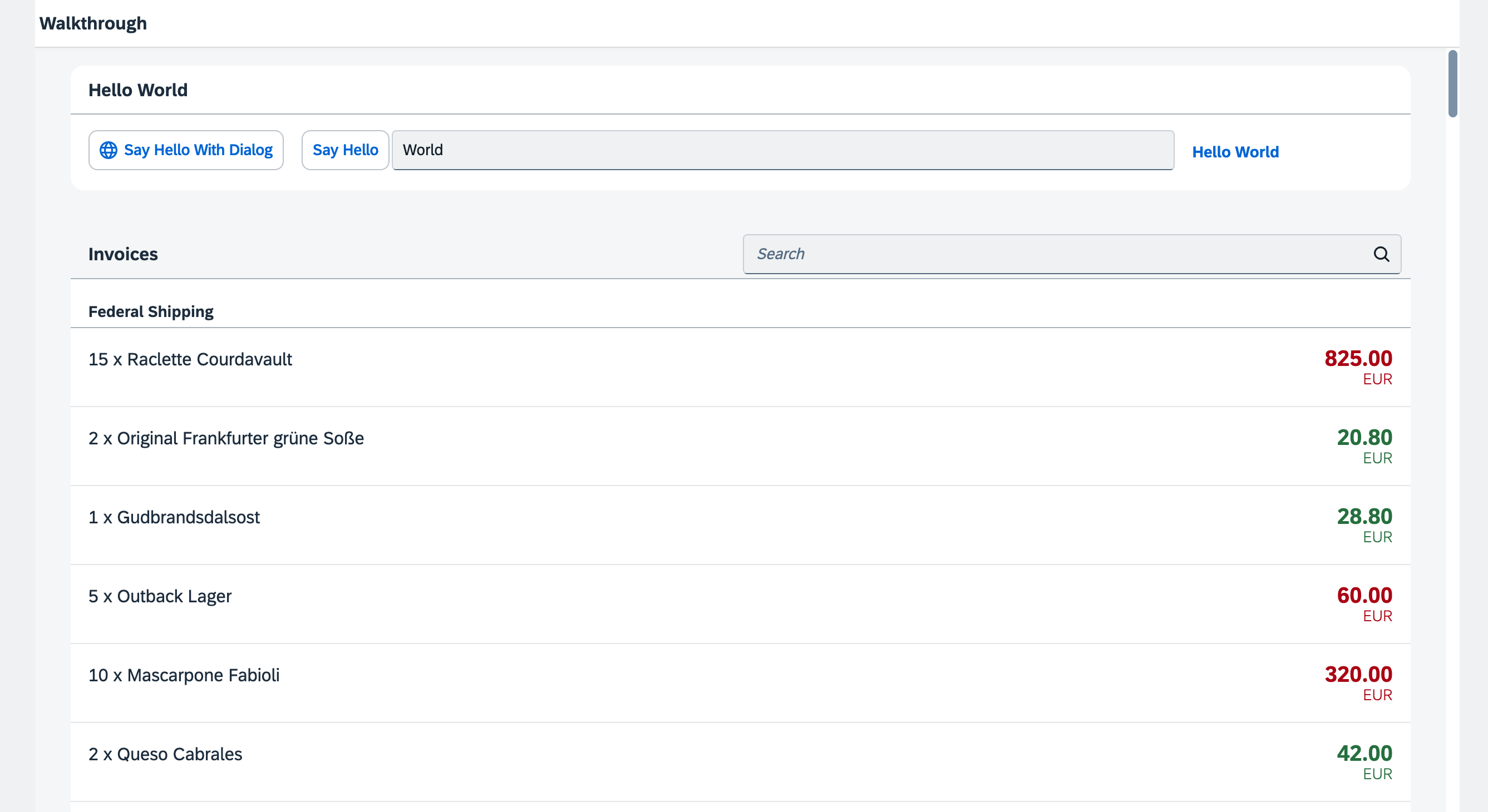
*Products from the OData invoices test service are now shown within our app*
*A real-time preview utilizing data from the OData remote service is currently unavailable in this setup. However, we assure you that it will work on your local machine as long as you avoid making any mistakes. So, give it a try and see the results for yourself!*
***
### Coding
You can download the solution for this step here: [📥 Download step 25](https://ui5.github.io/tutorials/walkthrough/walkthrough-step-25.zip).
You can download the solution for this step here: [📥 Download step 25](https://ui5.github.io/tutorials/walkthrough/walkthrough-step-25-js.zip).
***
### Development Environment
In this step, we want to use the publicly available Northwind OData service located at `https://services.odata.org/V2/Northwind/Northwind.svc/`. Therefore, our URI points to the official Northwind OData service. In order to avoid cross-origin resource sharing, the typical procedure is to use a proxy in UI5 CLI and maintain only a path in the `URI` property of the data source of our app.
A bunch of proxy solutions are available from the UI5 community as [UI5 CLI custom middleware extensions](https://bestofui5.org/#/packages?tokens=proxy:tag).
In this tutorial we'll use [ui5-middleware-simpleproxy](https://bestofui5.org/#/packages/ui5-middleware-simpleproxy).
***
### Install Proxy Server
Open a new terminal window in your app root folder and execute `npm i -D ui5-middleware-simpleproxy` to install this package as a new development dependency in your `package.json`.
### ui5.yaml
We now configure the `ui5-middleware-simpleproxy` in the `ui5.yaml` file, so the proxy is used with the UI5 CLI when serving the app.
We schedule the simpleproxy middleware after the `compression` middleware, right after the livereload middleware. The `mountPath` property configures which URLs will be caught by the proxy. The `configuration/baseUri` property stores the real server address.
```yaml
specVersion: '3.0'
metadata:
name: "ui5.walkthrough"
type: application
framework:
name: OpenUI5
version: "1.145.1"
libraries:
- name: sap.m
- name: sap.ui.core
- name: themelib_sap_horizon
builder:
customTasks:
- name: ui5-tooling-transpile-task
afterTask: replaceVersion
configuration:
transformAsyncToPromise: true
server:
customMiddleware:
- name: ui5-tooling-transpile-middleware
afterMiddleware: compression
configuration:
transformAsyncToPromise: true
- name: ui5-middleware-simpleproxy
afterMiddleware: compression
mountPath: /V2
configuration:
baseUri: "https://services.odata.org"
```
### manifest.json
As a next step we need to update our `manifest.json` file, so the remote OData service can be instantiated by the component.
In the `sap.app` section of the descriptor file, we add a data source configuration. With the `invoiceRemote` key, we specify a configuration object that allows automatic model instantiation. We specify the type of the service \(`OData`\) and the model version \(`2.0`\).
In the `models` section, we replace the content of the `invoice` model. This key is still used as model name when the model is automatically instantiated during the component initialization. However, the `invoiceRemote` value of the `dataSource` key is a reference to the data source section that we specified above. This configuration allows the component to retrieve the technical information for this model during the start-up of the app.
```json
{
...
"sap.app": {
...
"applicationVersion": {
"version": "1.0.0"
},
"dataSources": {
"invoiceRemote": {
"uri": "V2/Northwind/Northwind.svc/",
"type": "OData",
"settings": {
"odataVersion": "2.0"
}
}
}
},
...
"sap.ui5": {
...
"models": {
"i18n": {
...
},
"invoice": {
"dataSource": "invoiceRemote"
}
},
"resources": {
"css": [
{
"uri": "css/style.css"
}
]
}
}
}
```
Our component now automatically creates an instance of `sap.ui.model.odata.v2.ODataModel` according to the settings we specified above, and makes it available as a model named `invoice`. When you use the `invoiceRemote` data source, the `ODataModel` fetches the data from the real Northwind OData service. The invoices we receive from the Northwind OData service have identical properties as the JSON data we used previously \(except for the `status` property, which is not available in the Northwind OData service\).
> 📝 **Note:**
> If you want to have a default model on the component, you can change the name of the model to an empty string in the descriptor file.
>
> Automatically instantiated models can be retrieved by calling `this.getModel` in the component. In the controllers of component-based apps you can call `this.getView().getModel()` to get the automatically instantiated model. For retrieving a named model you have to pass on the model name defined in the descriptor file to `getModel`, that is, in the component you would call `this.getModel("invoice")` to get our automatically generated `invoice` model that we defined in the descriptor.
As our app is now bound to a remote OData service, we do not need the `invoices.json` file anymore, so you can delete it.
***
**Next:** [Step 26: Mock Server Configuration](../26/README.md "We just ran our app against a real service, but for developing and testing our app we do not want to rely on the availability of the “real” service or put additional load on the system where the data service is located.")
**Previous:** [Step 24: Sorting and Grouping](../24/README.md "To make our list of invoices even more user-friendly, we sort it alphabetically instead of just showing the order from the data model. Additionally, we introduce groups and add the company that ships the products so that the data is easier to consume.")
***
**Related Information**
[OData Home Page](http://www.odata.org/)
[API Reference: `sap.ui.model.odata.v2.ODataModel`](https://sdk.openui5/#/api/sap.ui.model.odata.v2.ODataModel)
[First-Aid Kit](https://sdk.openui5.org/topic/dfe4f79843c44c40b3fb95ebffb65646.html "This section contains the most common issues that you might face when developing OpenUI5 apps and how to solve them.")
[NPM Package: `ui5-middleware-simpleproxy`](https://www.npmjs.com/package/ui5-middleware-simpleproxy "Middleware for ui5-server, enabling proxy support.")