## Step 19: Aggregation Binding
Now that we have established a good structure for our app, it's time to add some more functionality. We start exploring more features of data binding by adding some invoice data in JSON format that we display in a list below the panel.
***
### Preview
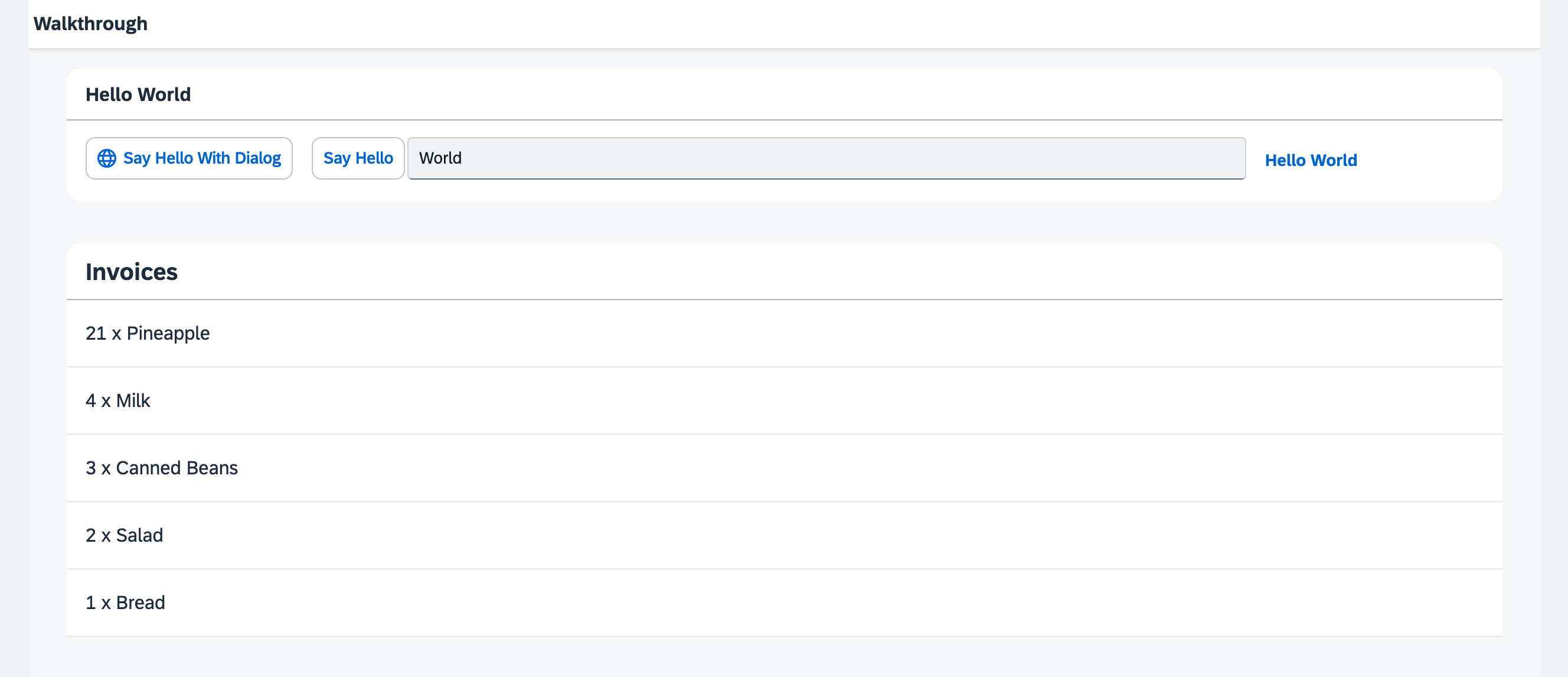
*A list of invoices is displayed below the panel*
You can access the live preview by clicking on this link: [🔗 Live Preview of Step 19](https://ui5.github.io/tutorials/walkthrough/build/19/index-cdn.html).
***
### Coding
You can download the solution for this step here: [📥 Download step 19](https://ui5.github.io/tutorials/walkthrough/walkthrough-step-19.zip).
You can download the solution for this step here: [📥 Download step 19](https://ui5.github.io/tutorials/walkthrough/walkthrough-step-19-js.zip).
***
### webapp/model/localInvoices.json \(New\)
We create a new folder `model` in our app project and place the new `localInvoices.json` file in it. We describe the following JSON data in the file:
```json
{
"Invoices": [
{
"ProductName": "Pineapple",
"Quantity": 21,
"ExtendedPrice": 87.2,
"ShipperName": "Fun Inc.",
"ShippedDate": "2015-04-01T00:00:00",
"Status": "A"
},
{
"ProductName": "Milk",
"Quantity": 4,
"ExtendedPrice": 10,
"ShipperName": "ACME",
"ShippedDate": "2015-02-18T00:00:00",
"Status": "B"
},
{
"ProductName": "Canned Beans",
"Quantity": 3,
"ExtendedPrice": 6.85,
"ShipperName": "ACME",
"ShippedDate": "2015-03-02T00:00:00",
"Status": "B"
},
{
"ProductName": "Salad",
"Quantity": 2,
"ExtendedPrice": 8.8,
"ShipperName": "ACME",
"ShippedDate": "2015-04-12T00:00:00",
"Status": "C"
},
{
"ProductName": "Bread",
"Quantity": 1,
"ExtendedPrice": 2.71,
"ShipperName": "Fun Inc.",
"ShippedDate": "2015-01-27T00:00:00",
"Status": "A"
}
]
}
```
The `localinvoices` file simply contains five invoices in a JSON format that we can use to bind controls against them in the app. JSON is a very lightweight format for storing data and can be directly used as a data source for OpenUI5 applications.
### webapp/manifest.json
We add a new named model `invoice` to the `sap.ui5` section of the descriptor. This time we want a JSONModel, so we set the type to `sap.ui.model.json.JSONModel`. The `uri` key is the path to our data relative to the component.
```json
{
...
"sap.ui5": {
...
"models": {
"i18n": {
"type": "sap.ui.model.resource.ResourceModel",
"settings": {
"bundleName": "ui5.walkthrough.i18n.i18n",
"supportedLocales": [
""
],
"fallbackLocale": ""
}
},
"invoice": {
"type": "sap.ui.model.json.JSONModel",
"uri": "model/localInvoices.json"
}
},
"resources": {
"css": [
{
"uri": "css/style.css"
}
]
}
}
}
```
With this little configuration our component will automatically instantiate a new `JSONModel` which loads the invoice data from the `localInvoices.json` file. Finally, the instantiated `JSONModel` is put onto the component as a named model invoice. The named model is then visible throughout our app.
### webapp/i18n/i18n.properties
In the text bundle we create a new text for a Invoice List title we will need in the view we are about to create.
```ini
...
# Hello Panel
showHelloButtonText=Say Hello
helloMsg=Hello {0}
homePageTitle=UI5 TypeScript Walkthrough
helloPanelTitle=Hello World
openDialogButtonText=Say Hello With Dialog
dialogCloseButtonText=Ok
# Invoice List
invoiceListTitle=Invoices
```
### webapp/view/InvoiceList.view.xml \(New\)
In the view folder, we create a new `InvoiceList.view.xml` view to display the invoices. We use a list control with the custom header text we only specified in our resource bundle and assign the CSS class `sapUiResponsiveMargin` to it. The item aggregation of the list we bound to the root path `Invoices` of the JSON data in our invoice model. And since we defined a named model, we have to prefix each binding definition with the identifier `invoice` followed by the '>' symbol.
In the `items` aggregation, we define the template for the list that will be automatically repeated for each invoice of our test data. More precisely, we use an `sap/m/ObjectListItem` to create a control for each aggregated child of the `items` aggregation. The `title` property of the list item is bound to the properties `Quantity` and `ProductName` of a single invoice. This is achieved by defining a relative path \(without `/` in the beginning\).
```xml
```
The binding in the list item works, because we have bound the `items` aggregation via `items={invoice>/Invoices}` to the invoices.
### webapp/view/App.view.xml
In the app view we add a second view and assign it to our newly created InvoiceList view to display our invoices below the panel.
```xml
```
***
### Conventions
- Any files needed for creating models and logic relating to model data are stored in the `model` folder. This includes grouping, filtering and formatting data
- Model file names are lowercased
***
**Next:** Step 20: [Data Types](../20/README.md "The list of invoices is already looking nice, but what is an invoice without a price assigned? Typically prices are stored in a technical format and with a '.' delimiter in the data model. For example, our invoice for pineapples has the calculated price 87.2 without a currency. We are going to use the OpenUI5 data types to format the price properly, with a locale-dependent decimal separator and two digits after the separator.")
**Previous:** Step 18: [Icons](../18/README.md "Our dialog is still pretty much empty. Since OpenUI5 is shipped with a large icon font that contains more than 500 icons, we will add an icon to greet our users when the dialog is opened.")
***
**Related Information**
[Folder Structure: Where to Put Your Files](https://sdk.openui5.org/topic/003f755d46d34dd1bbce9ffe08c8d46a.html "The details described here represent a best practice for structuring an application that features one component, one OData service and less than 20 views. If you're building an app that has more components, OData services and views, you may have to introduce more folder levels than described here.")
[Lists](https://sdk.openui5.org/#/topic/1da158152f644ba1ad408a3e982fd3df.html "Lists have properties and events and they contain list items that inherit from sap.m.ListItemBase, which provides navigation, selection and event features. The list item type determines the way the list item interacts by providing additional features.")
[List Binding (Aggregation Binding)](https://sdk.openui5.org/#/topic/91f057786f4d1014b6dd926db0e91070.html "List binding (or aggregation binding) is used to automatically create child controls according to model data.")
[API Reference: `sap.ui.base.ManagedObject.AggregationBindingInfo`](https://sdk.openui5.org/api/sap.ui.base.ManagedObject.AggregationBindingInfo)
[API Reference: sap.m.List](https://sdk.openui5.org/#/api/sap.m.List)
[Samples: sap.m.List](https://sdk.openui5.org/#/entity/sap.m.List)