## Step 9: Component Configuration
After we have introduced all three parts of the Model-View-Controller \(MVC\) concept, we now come to another important structural aspect of OpenUI5.
In this step, we will enhance our application by encapsulating all UI assets within a component in OpenUI5. By doing so, we create an independent and reusable module independent of a local HTML file for the bootstrap. This architectural change enables us to access resources relative to the component, rather than relative to the `index.html` file.
By encapsulating our application as a component, we can seamlessly integrate it into surrounding containers like the SAP Fiori launchpad. This means our application can be easily embedded within a larger ecosystem, providing a more cohesive and integrated user experience.
***
### Preview
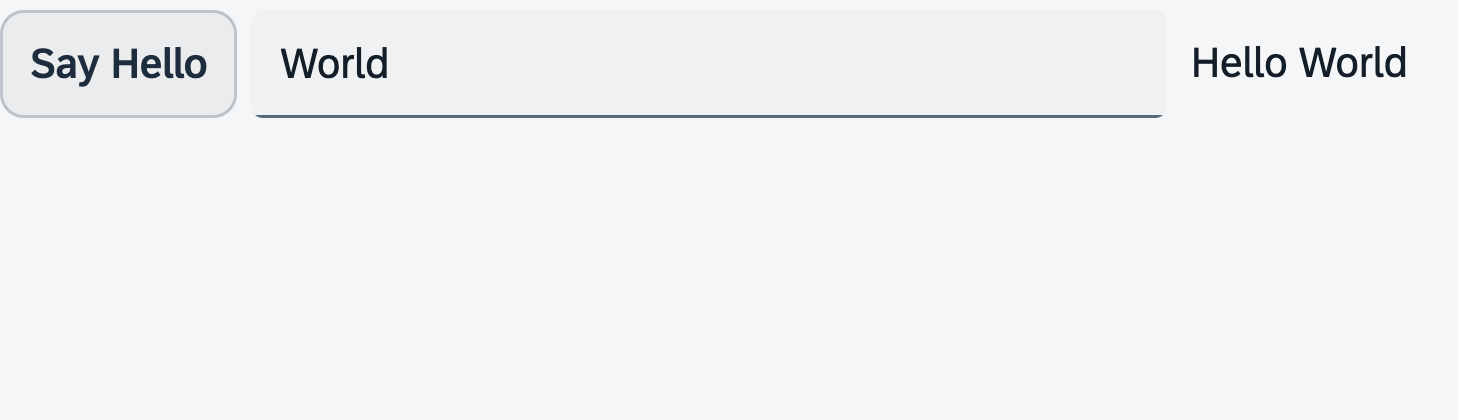
*An input field and a description displaying the value of the input field \(No visual changes to last step\)*
You can access the live preview by clicking on this link: [🔗 Live Preview of Step 9](https://ui5.github.io/tutorials/walkthrough/build/09/index-cdn.html).
After this step your project structure will look like the figure below. We will create the `Component.?s` file now and modify the related files in the app.
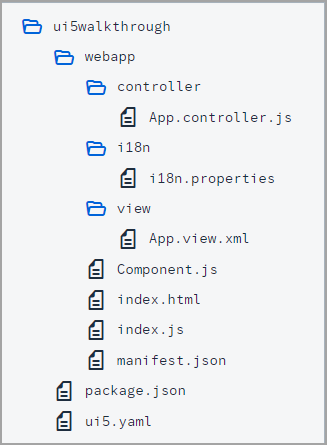
*Folder Structure for this Step*
***
### Coding
You can download the solution for this step here: [📥 Download step 9](https://ui5.github.io/tutorials/walkthrough/walkthrough-step-09.zip).
You can download the solution for this step here: [📥 Download step 9](https://ui5.github.io/tutorials/walkthrough/walkthrough-step-09-js.zip).
***
### webapp/Component.?s \(New\)
We navigate to the `webapp` folder and place the `Component.?s` file to it. This file is commonly referred to as the component controller. A component is organized in a unique namespace \(which is synonymous with the application namespace\). All required and optional resources of the component have to be organized in the namespace of the component.
We define the component by extending `sap/ui/core/UIComponent` and supplement the component with additional metadata. Within the `interfaces` settings, we specify that the component should implement the `sap/ui/core/IAsyncContentCreation` interface. This allows the component to be generated asynchronously, which in turn sets the component's rootView and router configuration to async.
When the component is instantiated, OpenUI5 automatically calls the `init` function of the component. It's obligatory to make the super call to the `init` function of the base class in the overridden `init` method. In this section, we also instantiate our data model and the `i18n` model, similar to what we did earlier in the `onInit` function of our app controller (*Hint: besides the `bundleName` we also specifiy the `supportedLocales` with an empty string as value in an array and an empty `fallbackLocale` to ensure that just the default `messagebundle.properties` is loaded without a language suffix to avoid 404s during development!*).
Finally we call the `createContent` hook method of the component. This method creates the content \(UI Control Tree\) of this component. Here, we create the view as we did in the `index.?s` file to set our app view as the root view of the component.
```ts
import Control from "sap/ui/core/Control";
import XMLView from "sap/ui/core/mvc/XMLView";
import JSONModel from "sap/ui/model/json/JSONModel";
import ResourceModel from "sap/ui/model/resource/ResourceModel";
import UIComponent from "sap/ui/core/UIComponent";
/**
* @namespace ui5.walkthrough
*/
export default class Component extends UIComponent {
public static metadata = {
"interfaces": ["sap.ui.core.IAsyncContentCreation"]
};
init(): void {
// call the init function of the parent
super.init();
// set data model
const data = {
recipient: {
name: "World"
}
};
const dataModel = new JSONModel(data);
this.setModel(dataModel);
// set i18n model
const i18nModel = new ResourceModel({
"bundleName": "ui5.walkthrough.i18n.i18n",
"supportedLocales": [""],
"fallbackLocale": ""
});
this.setModel(i18nModel, "i18n");
};
createContent(): Control | Promise | null {
return XMLView.create({
"viewName": "ui5.walkthrough.view.App",
"id": "app"
});
};
};
```
```js
sap.ui.define(["sap/ui/core/UIComponent", "sap/ui/core/mvc/XMLView", "sap/ui/model/json/JSONModel", "sap/ui/model/resource/ResourceModel"], function (UIComponent, XMLView, JSONModel, ResourceModel) {
"use strict";
const Component = UIComponent.extend("ui5.walkthrough.Component", {
metadata: {
"interfaces": ["sap.ui.core.IAsyncContentCreation"]
},
init() {
// call the init function of the parent
UIComponent.prototype.init.call(this);
// set data model
const data = {
recipient: {
name: "World"
}
};
const dataModel = new JSONModel(data);
this.setModel(dataModel);
// set i18n model
const i18nModel = new ResourceModel({
"bundleName": "ui5.walkthrough.i18n.i18n",
"supportedLocales": [""],
"fallbackLocale": ""
});
this.setModel(i18nModel, "i18n");
},
createContent() {
return XMLView.create({
"viewName": "ui5.walkthrough.view.App",
"id": "app"
});
}
});
;
return Component;
});
```
Be aware that the models are set directly on the component and not on the root view of the component. However, as nested controls automatically inherit the models from their parent controls, the models are available on the view as well.
***
### webapp/controller/App.controller.?s
We delete the `onInit` function from the app controller; this is now done in the component controller.
```ts
import MessageToast from "sap/m/MessageToast";
import Controller from "sap/ui/core/mvc/Controller";
import JSONModel from "sap/ui/model/json/JSONModel";
import ResourceModel from "sap/ui/model/resource/ResourceModel";
import ResourceBundle from "sap/base/i18n/ResourceBundle";
/**
* @name ui5.walkthrough.controller.App
*/
export default class AppController extends Controller {
onShowHello(): void {
// read msg from i18n model
const recipient = (this.getView()?.getModel() as JSONModel)?.getProperty("/recipient/name");
const resourceBundle = (this.getView()?.getModel("i18n") as ResourceModel)?.getResourceBundle() as ResourceBundle;
const msg = resourceBundle.getText("helloMsg", [recipient]);
// show message
MessageToast.show(msg);
}
};
```
```js
sap.ui.define(["sap/m/MessageToast", "sap/ui/core/mvc/Controller"], function (MessageToast, Controller) {
"use strict";
/**
* @name ui5.walkthrough.controller.App
*/
const AppController = Controller.extend("ui5.walkthrough.controller.App", {
onShowHello() {
// read msg from i18n model
// functions with generic return values require casting
const resourceBundle = this.getView()?.getModel("i18n")?.getResourceBundle();
const recipient = this.getView()?.getModel()?.getProperty("/recipient/name");
const msg = resourceBundle.getText("helloMsg", [recipient]);
// show message
MessageToast.show(msg);
}
});
;
return AppController;
});
```
***
#### webapp/index.?s
We'll replace the view with a UI component. To do this, we use a control called `ComponentContainer`. This control allows us to wrap a UI Component and place it in our HTML document. We configure this instance by providing the following options:
- We assign the `id` property to `"container"` so that we can refer to it later if needed.
- We set the `name` property to the namespace of the component. This tells the `ComponentContainer` control which UI component it should load and show.
- We pass the `id: "walkthrough"` to our component through the `ComponentContainer` constructor's settings argument. This ID helps us identify our component among others that may be created during the application's runtime.
- To ensure the ID of our component is unique and avoid any mix-ups, we set the `autoPrefixId` property to `true`. This automatically adds a prefix to the ID of the Component, which is the ID of the ComponentContainer followed by a single dash ("`-`").
- For better loading performance, we set the `async` property to `true`. This allows the component and its dependencies to load in the background without blocking other parts of the application.
Finally, we position our newly created `ComponentContainer` control within the HTML element with the id `content`.
```ts
import ComponentContainer from "sap/ui/core/ComponentContainer";
new ComponentContainer({
id: "container",
name: "ui5.walkthrough",
settings: {
id: "walkthrough"
},
autoPrefixId: true,
async: true
}).placeAt("content");
```
```js
sap.ui.define(["sap/ui/core/ComponentContainer"], function (ComponentContainer) {
"use strict";
new ComponentContainer({
id: "container",
name: "ui5.walkthrough",
settings: {
id: "walkthrough"
},
autoPrefixId: true,
async: true
}).placeAt("content");
});
```
***
### Conventions
- The component is named `Component.?s`.
- Together with all UI assets of the app, the component is located in the `webapp` folder.
- The `index.html` file is located in the `webapp` folder if it is used productively.
***
**Next:** [Step 10: Manifest (Descriptor for Applications)](../10/README.md "All application-specific configuration settings will now further be put into the manifest. This clearly separates the application coding from the configuration settings and makes our app even more flexible.")
**Previous:** [Step 8: Translatable Texts](../08/README.md "In this step we move the texts of our UI to a separate resource file.")
***
**Related Information**
[Components](https://sdk.openui5.org/topic/958ead51e2e94ab8bcdc90fb7e9d53d0.html "Components are independent and reusable parts used in OpenUI5 applications.")
[Methods Controlling the Initial Instantiation](https://sdk.openui5.org/topic/b430345887f1419fba50320b57c1bdf9.html "OpenUI5 provides two methods for the initial instantiation of the component.")
[Advanced Concepts for OpenUI5 Components](https://sdk.openui5.org/topic/ecbc417ff264498b96bc364c53280242.html "Advanced concepts for components include routing and navigation and component data as well as the event bus.")
[API Reference: `sap.ui.core.ComponentContainer`](https://sdk.openui5.org/api/sap.ui.core.ComponentContainer)