tutorials
Step 15: Reuse an Existing Route
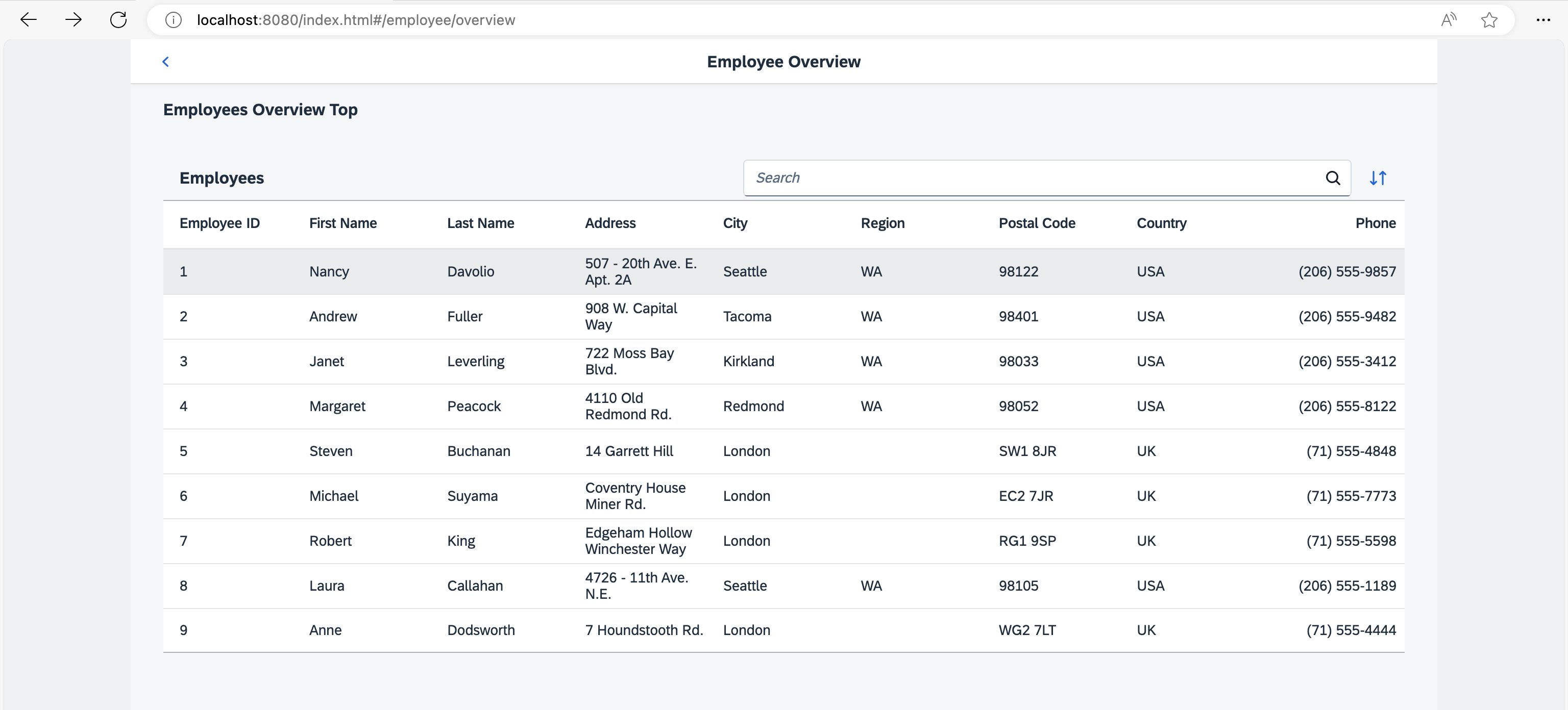
The Employees table displays employee data. However, the resumes of the employees are not accessible from this view yet. We could create a new route and a new view to visualize the resume again, but we could also simply reuse an existing route to cross-link the resume of a certain employee. In this step, we will add a feature that allows users to directly navigate to the resume of a certain employee. We will reuse the Resume page that we have created in an earlier step. This example illustrates that there can be multiple navigation paths that direct to the same page.
Preview
Navigation to an existing route from a table item
You can view this step live: 🔗 Live Preview of Step 15.
Coding
You can download the solution for this step here: 📥 Download step 15 (TS)📥 Download step 15 (JS).
webapp/view/employee/overview/EmployeeOverviewContent.view.xml
<mvc:View
  controllerName="ui5.tutorial.navigation.controller.employee.overview.EmployeeOverviewContent"
  xmlns="sap.m"
  xmlns:mvc="sap.ui.core.mvc">
  <Table id="employeesTable"
    items="{/Employees}"
    itemPress=".onItemPressed">
    <headerToolbar>
      ...
    </headerToolbar>
    <columns>
      ...
    </columns>
    <items>
      <ColumnListItem type="Active">
        <cells>
          ...
        </cells>
      </ColumnListItem>
    </items>
  </Table>
</mvc:View>
In the EmployeeOverviewContent view we register an event handler for the itemPress event and set the type attribute of the ColumnListItem to Active so that we can choose an item and trigger the navigation.
webapp/controller/employee/overview/EmployeeOverviewContent.controller.ts/.js
// webapp/controller/employee/overview/EmployeeOverviewContent.controller.ts
import { ListBase$ItemPressEvent } from "sap/m/ListBase";
import SearchField, { SearchField$SearchEvent } from "sap/m/SearchField";
import Table from "sap/m/Table";
import ViewSettingsDialog, { ViewSettingsDialog$ConfirmEvent, ViewSettingsDialog$CancelEvent } from "sap/m/ViewSettingsDialog";
import ViewSettingsItem from "sap/m/ViewSettingsItem";
import BaseController from "ui5/tutorial/navigation/controller/BaseController";
import Filter from "sap/ui/model/Filter";
import FilterOperator from "sap/ui/model/FilterOperator";
import ListBinding from "sap/ui/model/ListBinding";
import Sorter from "sap/ui/model/Sorter";
import { Route$MatchedEvent } from "sap/ui/core/routing/Route";

/**
 * @namespace ui5.tutorial.navigation.controller.employee.overview
 */
export default class EmployeeOverviewContent extends BaseController {
	...
	public onItemPressed(event: ListBase$ItemPressEvent): void {
		const listItem = event.getParameter("listItem");
		const context = listItem.getBindingContext();

		this.getRouter().navTo("employeeResume",{
		employeeId : context.getProperty("EmployeeID"),
			"?query" : {
				tab : "Info"
			}
		});
	}
	...
}
// webapp/controller/employee/overview/EmployeeOverviewContent.controller.js
sap.ui.define(["sap/m/ViewSettingsDialog", "sap/m/ViewSettingsItem", "ui5/tutorial/navigation/controller/BaseController", "sap/ui/model/Filter", "sap/ui/model/FilterOperator", "sap/ui/model/Sorter"], function (ViewSettingsDialog, ViewSettingsItem, BaseController, Filter, FilterOperator, Sorter) {
	"use strict";

	const EmployeeOverviewContent = BaseController.extend("ui5.tutorial.navigation.controller.employee.overview.EmployeeOverviewContent", {
		constructor() {
			BaseController.prototype.constructor.apply(this, arguments);
			this.sortField = null;
			this.sortDescending = false;
			this.validSortFields = ["EmployeeID", "FirstName", "LastName"];
			this.searchQuery = null;
			this.routerArgs = null;
		},
		onInit() {
			const router = this.getRouter();
			this.table = this.byId("employeesTable");
			this._initViewSettingsDialog();

			// make the search bookmarkable
			router.getRoute("employeeOverview").attachMatched(this._onRouteMatched, this);
		},
		_onRouteMatched(event) {
			// save the current query state
			this.routerArgs = event.getParameter("arguments");
			this.routerArgs["?query"] ||= {};
			const queryParameter = this.routerArgs["?query"];

			// search/filter via URL hash
			this._applySearchFilter(queryParameter.search);

			// sorting via URL hash
			this._applySorter(queryParameter.sortField, queryParameter.sortDescending);

			// show dialog via URL hash
			if (queryParameter.showDialog) {
				this.viewSettingsDialog.open();
			}
		},
		onSortButtonPressed() {
			const router = this.getRouter();
			this.routerArgs["?query"].showDialog = 1;
			router.navTo("employeeOverview", this.routerArgs);
		},
		onSearchEmployeesTable(event) {
			const router = this.getRouter();

			// update the hash with the current search term
			this.routerArgs["?query"].search = event.getSource().getValue();
			router.navTo("employeeOverview", this.routerArgs, true /*no history*/);
		},
		onItemPressed(event) {
			const listItem = event.getParameter("listItem");
			const context = listItem.getBindingContext();
			this.getRouter().navTo("employeeResume", {
				employeeId: context.getProperty("EmployeeID"),
				"?query": {
					tab: "Info"
				}
			});
		},
		_initViewSettingsDialog() {
			const router = this.getRouter();
			this.viewSettingsDialog = new ViewSettingsDialog("vsd", {
				confirm: event => {
					const sortItem = event.getParameter("sortItem");
					this._applySorter(sortItem.getKey(), event.getParameter("sortDescending"));
					this.routerArgs["?query"].sortField = sortItem.getKey();
					this.routerArgs["?query"].sortDescending = event.getParameter("sortDescending");
					delete this.routerArgs["?query"].showDialog;
					router.navTo("employeeOverview", this.routerArgs, true /*without history*/);
				},
				cancel: event => {
					delete this.routerArgs["?query"].showDialog;
					router.navTo("employeeOverview", this.routerArgs, true /*without history*/);
				}
			});

			// init sorting (with simple sorters as custom data for all fields)
			this.viewSettingsDialog.addSortItem(new ViewSettingsItem({
				key: "EmployeeID",
				text: "Employee ID",
				selected: true // by default the MockData is sorted by EmployeeID
			}));
			this.viewSettingsDialog.addSortItem(new ViewSettingsItem({
				key: "FirstName",
				text: "First Name",
				selected: false
			}));
			this.viewSettingsDialog.addSortItem(new ViewSettingsItem({
				key: "LastName",
				text: "Last Name",
				selected: false
			}));
		},
		_applySearchFilter(searchQuery) {
			// first check if we already have this search value
			if (this.searchQuery === searchQuery) {
				return;
			}
			this.searchQuery = searchQuery;
			this.byId("searchField").setValue(searchQuery);
			let filter = null;

			// add filters for search
			if (searchQuery?.length > 0) {
				const filters = [];
				filters.push(new Filter("FirstName", FilterOperator.Contains, searchQuery));
				filters.push(new Filter("LastName", FilterOperator.Contains, searchQuery));
				filter = new Filter({
					filters: filters,
					and: false
				}); // OR filter
			}

			// update list binding
			const binding = this.table.getBinding("items");
			binding.filter(filter, "Application");
		},
		/**
		 * Applies sorting on our table control.
		 * @param {string} fieldName the name of the field used for sorting
		 * @param {boolean} sortDescending whether to sort descending
		 * @private
		 */
		_applySorter(fieldName, sortDescending) {
			// only continue if we have a valid sort field
			if (fieldName && this.validSortFields.includes(fieldName)) {
				// sort only if the sorter has changed
				if (this.sortField && this.sortField === fieldName && this.sortDescending === sortDescending) {
					return;
				}
				this.sortField = fieldName;
				this.sortDescending = sortDescending;
				const sorter = new Sorter(fieldName, sortDescending);

				// sync with View Settings Dialog
				this._syncViewSettingsDialogSorter(fieldName, sortDescending);
				const binding = this.table.getBinding("items");
				binding.sort(sorter);
			}
		},
		_syncViewSettingsDialogSorter(sortField, sortDescending) {
			// the possible keys are: "EmployeeID" | "FirstName" | "LastName"
			// Note: no input validation is implemented here
			this.viewSettingsDialog.setSelectedSortItem(sortField);
			this.viewSettingsDialog.setSortDescending(sortDescending);
		}
	});
	return EmployeeOverviewContent;
});
Next we add the itemPress handler .onItemPressed to the EmployeeOverviewContent controller. It reads from the binding context which item has been chosen and navigates to the employeeResume route. We have already added this route and the corresponding target in a previous step and can now reuse it. From now on it is possible to navigate to the employeeResume route from our employee table as well as from the employee detail page created in an earlier step (the route name is employee).
Next: Step 16: Handle Invalid Hashes by Listening to Bypassed Events
Previous: Step 14: Make Dialogs Bookmarkable