docs
Hyphenation for Text Controls
OpenUI5 offers the possibility to hyphenate words in multiline texts when controls are in wrapping mode.
Overview
The hyphenation feature is an intelligent wrapping capability for optimal visual rendering of multiline text. It is especially useful for longer text instances in any type of container.
It is enabled through the wrappingType property for the following controls:
-
sap.m.Text -
sap.m.Title -
sap.m.Label
Use Cases
Using the integrated hyphenation through the wrappingType property directly in the text controls
All three controls have a wrapping property that determines text wrapping. By default, it is set to true for the sap.m.Text control and to false for sap.m.Label and sap.m.Title. Setting the wrapping property of these controls to true allows you to use the wrappingType property which enables hyphenation. It’s an enum property with two possible values:
WrappingType.Normal– The text wraps on several lines keeping the words in their entirety.WrappingType.Hyphenated– The text wraps on several lines separating words into syllables and marking the syllabification with a hyphen.
Example:
// Label required from "sap/m/Label"
// WrappingType required from "sap/m/library"

new Label({
    text: "Liquiditätspositionshierarchie Datenänderungsbelege",
    wrapping: true,
    wrappingType: WrappingType.Hyphenated
});
Using the sap.ui.core.hyphenation.Hyphenation API
This class provides methods to evaluate the possibility of using browser-native hyphenation or to initialize and use a third-party hyphenation module. Using this API you can check if browser-native hyphenation is supported for a particular language.
If browser-native hyphenation is not supported, you can directly use this API to hyphenate texts. A third-party library named Hyphenopoly is used in that case.
As the sap.ui.core.hyphenation.Hyphenation class is a singleton, an instance should be acquired from the getInstance method.
Example:
// Hyphenation required from "sap/ui/core/hyphenation/Hyphenation"
var oHyphenationApi = Hyphenation.getInstance();

if (!oHyphenationApi.canUseNativeHyphenation("en")) {
    oHyphenationApi.initialize("en").then(function() {
        console.log(oHyphenationApi.hyphenate("An example text to hyphenate.", "en"));
    });
}
Manual control of hyphenation when third-party resources are loaded.
By default, the text controls load any required third-party resources at a later state which can lead to flickering of the first visible text control between its unhyphenated and hyphenated states. To prevent this, you can prepare the third-party library before rendering your app.
Example:
Hyphenation.getInstance()
    .initialize()
    .then(function() {
        // continue with application initialization/rendering
    });
How It Works for Text Controls
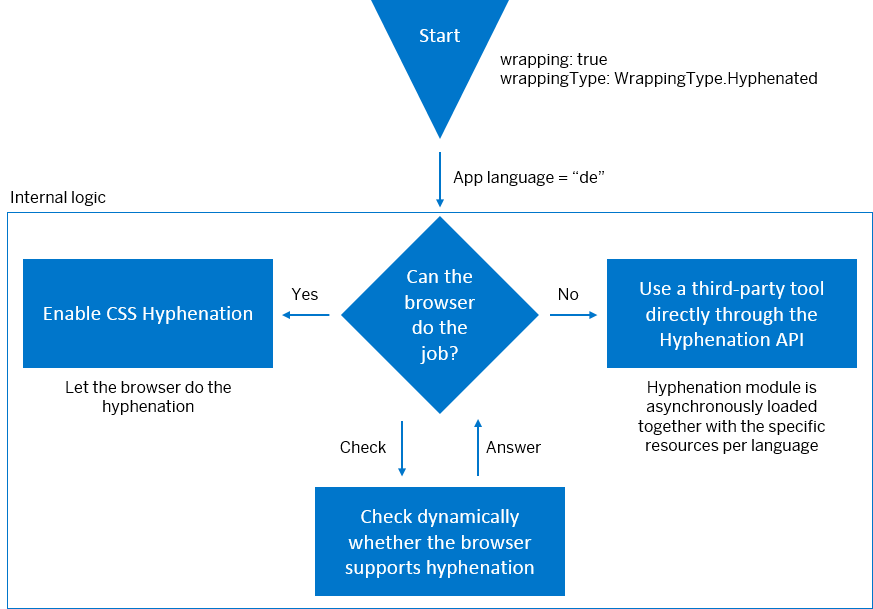
We’ve taken the following dynamic approach to hyphenation:
- We use browser-native hyphenation when possible;
- If browser hyphenation is not possible – we use a third-party tool called Hyphenopoly through the
sap.ui.core.hyphenation.HyphenationAPI.
Once you’ve set the control property to WrappingType.Hyphenated, the control instance checks dynamically whether the browser you’re using supports hyphenation. If yes, it enables the CSS hyphenation and lets the browser perform it. If it doesn’t, the process is redirected to a third-party tool and the hyphenation module is asynchronously loaded together with the specific resources per language. This is done through the sap.ui.core.hyphenation.Hyphenation API, which is responsible for loading all resources in an async mode and for the dynamic initialization of the third-party library with the language resources and some required configurations. It also caches the rules internally for future use.
When the framework makes the choice whether browser-native hyphenation or third-party hyphenation should be used, it logs a message in the console for more information about what was decided.
Hyphenation Workflow
Supported Languages
Caution:
Note that as the hyphenation feature uses third-party and browser-native tools, we are not responsible for any grammatical incorrectness or inconsistencies of the hyphenation. Also, the variety of supported languages is outside the scope of our control and may be subject to future changes.
OpenUI5 provides hyphenation through the hyphens CSS property or the third-party tool Hyphenopoly.
The following table provides a list of languages supported by the third-party tool Hyphenopoly (version 3.4.0). Texts in all other languages are hyphenated only if the used browser supports the hyphens CSS property for the specified language.
| Language | Code |
|---|---|
| Bulgarian | bg |
| Catalan | ca |
| Croatian | hr |
| Danish | da |
| Dutch | nl |
| English \(US\) | en |
| Estonian | et |
| Finnish | fi |
| French \(FR\) | fr |
| German | de |
| Greek | el |
| Hindi | hi |
| Hungarian | hu |
| Italian | it |
| Lithuanian | lt |
| Norwegian | no |
| Portuguese \(BR\) | pt |
| Russian | ru |
| Slovenian | sl |
| Spanish \(ES\) | es |
| Swedish | sv |
| Thai | th |
| Turkish | tr |
| Ukrainian | uk |
Related Information
API Reference: sap.m.WrappingType
API Reference: sap.ui.core.hyphenation.Hyphenation
hyphens CSS property and browser compatibility on MDN Web Docs