docs
Feed List Item
This control provides a set of properties for a feed, such as text, sender information and timestamp.
Overview
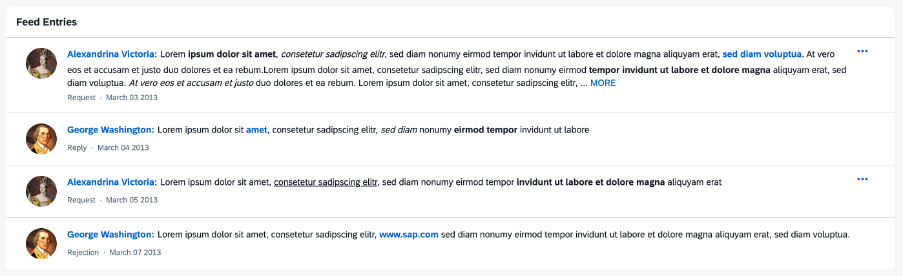
The sap.m.FeedListItem control is capable of displaying text accompanied by an optional user image.
For more information, see the API Reference and the Sample.
-
Responsiveness
The
sap.m.FeedListItemcontrol can be used in both small and large containers. -
Layout
The
FeedListItemcontrol consists of the user’s name and an optional picture of the user who wrote the note or the update (optional). The name can contain a link that triggers a quick overview of the user’s profile data. The actual text written by the user follows the name. TheFeedListItemcontrol includes thesap.m.FormattedTextcontrol that enables you to use HTML formatted text.For more information about the
FormattedTextcontrol, see the API Reference and the Samples. -
Behavior
When the text exceeds a certain number of characters (default value can be overwritten by the consuming application), the rest of the text is truncated and a MORE link appears. Clicking the link shows the entire text, and the link is renamed to LESS. Clicking LESS collapses the text back to its original truncated length.
-
Actions
Each item in the feed may also include an optional More button that provides access to additional actions that the user can perform on this feed item. The actions available for a feed item are specified in its
actionsaggregation and are defined usingFeedListItemActionelements.For more information about the
FeedListItemActionelement, see the API Reference.
The sap.m.FeedListItem control can be used in combination with the sap.m.FeedInput control as a feed or notes control. For more information, see Feed Input.