docs
Step 1: The Initial App
We start by setting up a simple app that loads data from an OData service and displays it in a table. We use a mock server to simulate requests to and responses from the service.
The structure and data model created in this step will be used throughout this tutorial to illustrate the OData V4 features in OpenUI5.
Preview
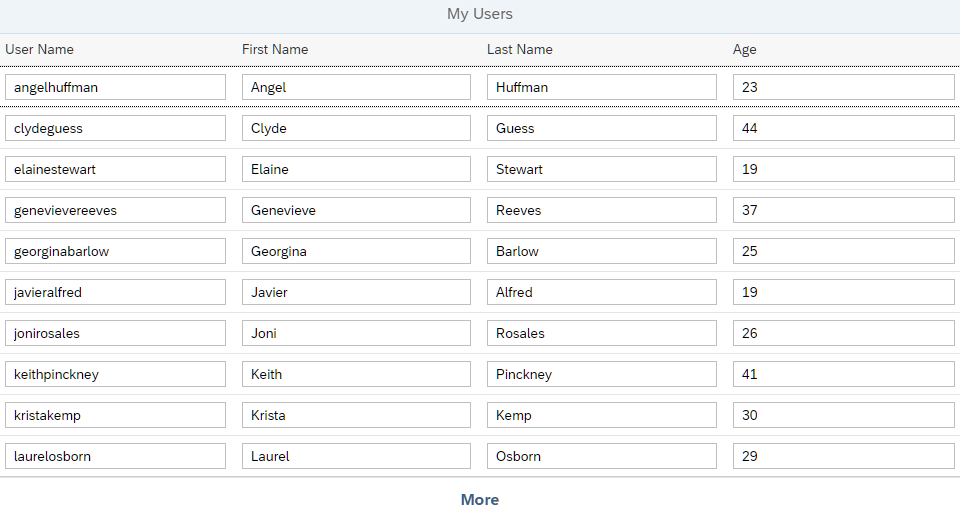
Initial app with a simple table
Setup
-
To set up your project for this tutorial, download the files at OData V4 - Step 1.
- Extract the downloaded
.zipfile at the desired location on your local machine. - Open a shell in the extracted folder and run
npm install. - Run
npm startto start the web server and to open a new browser window hosting your newly createdindex.html.
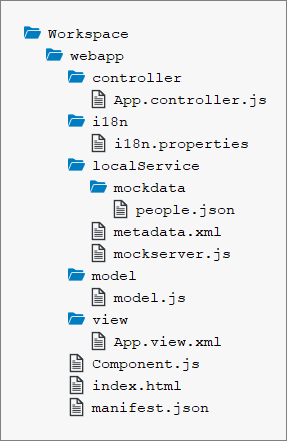
You should now have the following files:
Folder structure with downloaded files
The Initial App
The downloaded code includes an app that displays a table containing a table of users. For performance reasons, the table only loads 10 users at a time. More data can be retrieved by using the More button at the bottom of the page.
During the implementation of the app, we use local mock data so that we can concentrate on the application logic without dealing with back-end readiness or connectivity issues. We use the TripPin sample service as a “real” OData service.
The most important files are the following:
webapp/index.html
This file defines the home page of the app. It contains the bootstrap script and tells the runtime where to find our custom resources. It also initializes the mock server that intercepts all requests to the real TripPin service and sends back mock responses.
webapp/manifest.json
The manifest.json descriptor file contains the app configuration:
- In the
sap.appsection, the OData V4 service is configured as the default service. - In the
sap.ui5section, the OData V4.0 model provided by the default service is configured with the following settings:"preload": Whether to enable a preload model, thus improving the startup performance. For more information, see Manifest Model Preload."autoExpandSelect": Whether to automatically generate$selectand$expandsystem query options for service requests from the binding hierarchy of the OData model. Only data needed for the UI are then selected, leading to a minimal response size and improved performance. For more information, see Automatic determination of $expand and $select."earlyRequests": Whether the root$metadatadocument, the annotation files, and the security token are requested at the earliest convenience to speed up the start of your app or component.For more information, see the API Reference."operationMode": The operation mode for filtering and sorting; onlyServeris supported by the OData V4 model.For more information, see the API Reference.
{
    ...
    "sap.app": {
        ...
        "dataSources": {
            "default": {
                "uri": "https://services.odata.org/TripPinRESTierService/(S(id))/",
                "type": "OData",
                "settings": {
                    "odataVersion": "4.0"
                }
            }
        }
    },
    ...
    "sap.ui5": {
        ...
        "models": {
            ...
            "": {
                "dataSource": "default",
                "preload": true,
                "settings": {
                    "autoExpandSelect": true,
                    "earlyRequests": true,
                    "operationMode": "Server"
                }
            }
        }
    }
}
Mock server (webapp/localService/*)
Note:
The Mock Server included in this tutorial is only meant to support the features needed in this tutorial. Currently, there is no “general-purpose mock server” for application development available with OData V4 (like there is for OData V2).
The mockserver.js file contains the implementation of the mock server. It is quite simple since the mock server is only used to simulate certain types of requests to the TripPin service.
The metadata.xml file contains the service metadata that includes, for example, entity types and entity sets. Those define the possible requests as well as the structure of responses.
To be able to add data to the emulated OData responses, we have to store the entities for each entity type we use in a JSON file: The people.json file contains some data that is used for the mock service responses.
In this tutorial, we only use the entity type Person of the TripPin service. The entities of type Person are collected in the entity set People. Each Person has a key property UserName and the properties Age, FirstName, and LastName.
Parent topic:OData V4 Tutorial
Previous:Step 2: Data Access and Client-Server Communication
Related Information
OData Reference Services including TripPin
Bootstrapping: Loading and Initializing
Manifest (Descriptor for Applications, Components, and Libraries)